[Bash Tricks]: sudo to last run command
To re-run the previous command, we can use the below special way in bash. !! #This re-runs the previous command But the question is, why should i run '!!'...
To re-run the previous command, we can use the below special way in bash.
!! #This re-runs the previous commandBut the question is, why should i run '!!' instead of using up arrow for previous command. One quick use case would be for running 'sudo'. We often end up in 'Permission denied' error and re-run the same command using 'sudo' either by re-typing the whole command or by giving up arrow and navigate to the beginning using 'Home' Button or 'Side Arrows' or using 'Ctrl + a' (as mentioned in Quick Linux CLI tips, at least it was the best way). Another best way to re-run the previous command with 'sudo' can be the following.
sudo !!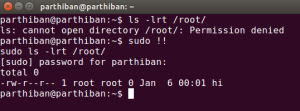
- Re run the previous command with sudo
Here is the working video of sudo to last run command https://youtu.be/\_hiv3ef7bg4
Working on something similar?
We build and upstream Embedded Linux & Zephyr RTOS for a living.
Talk to us